Optimize images on demand
Transform images in real-time with automatic WebP/AVIF conversion. Reduce file sizes by up to 80% without separate storage.


Fast image delivery worldwide
Optimize and serve images through Azion's distributed architecture so pages load faster across devices, browsers, and locations.
Automatic format and size optimization
Resize, compress, and convert images to WebP, AVIF, or fallback formats on demand without building manual variant pipelines.
No separate image storage required
Keep source assets in your existing origin and transform them by URL, avoiding upload workflows, duplicated files, and extra media infrastructure.
URL-based transformations without API complexity
Perform dynamic image transformations on demand via URL query parameters. Adapt dimensions, aspect ratio, quality, and format to each context—browser, screen size, or network conditions—without managing API calls or variant configurations.
Resize on-demand Quality control Format conversion URL-based API Chain operations No API auth required
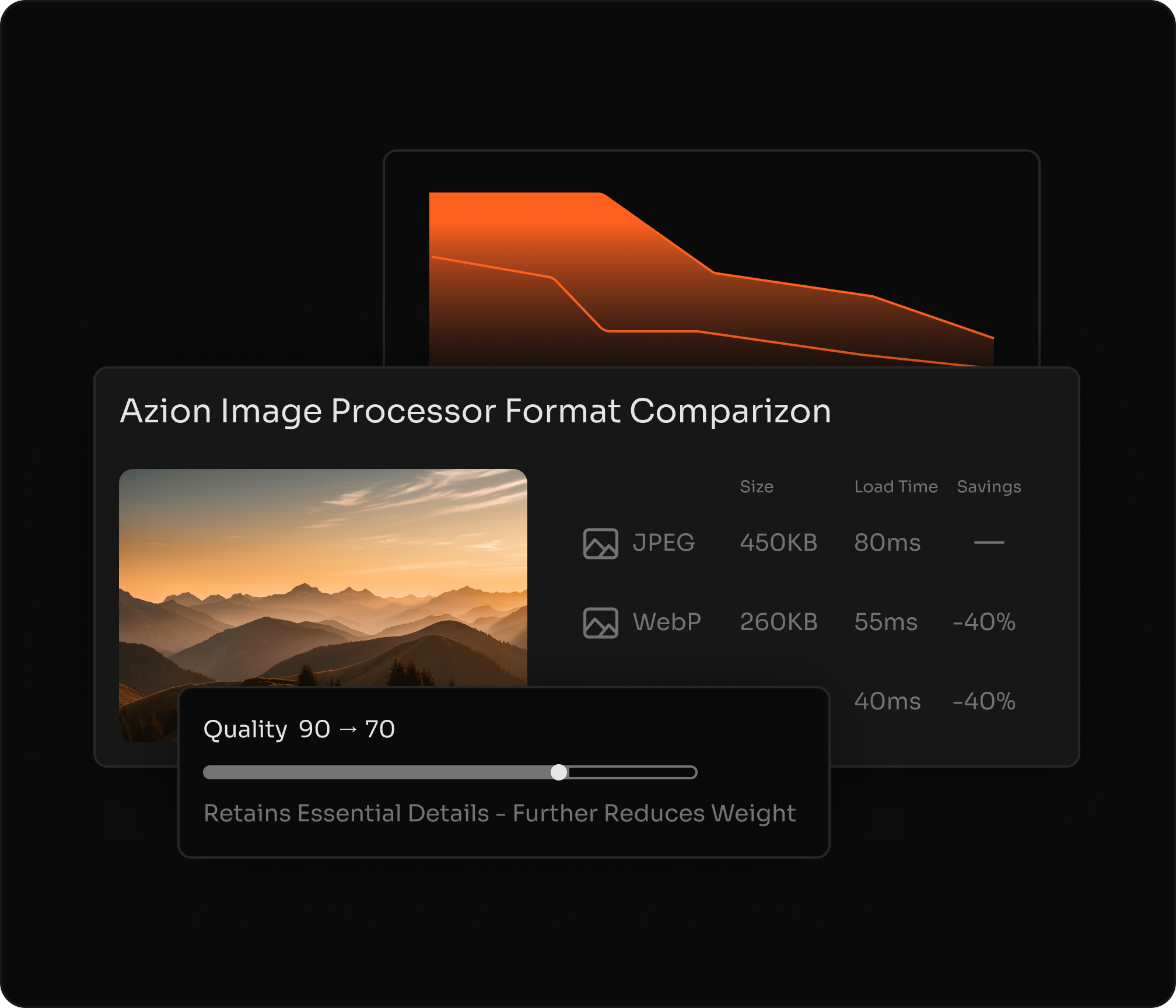
Multi-format optimization with automatic detection
Automatically adjust format, resolution, and quality based on browser and device while preserving visual fidelity and minimizing file size. Support for JPEG, PNG, GIF, BMP, ICO, WebP, and AVIF with intelligent format selection.
WebP & AVIF Browser-aware Device-aware Smart compression Accept headers Fallback handling
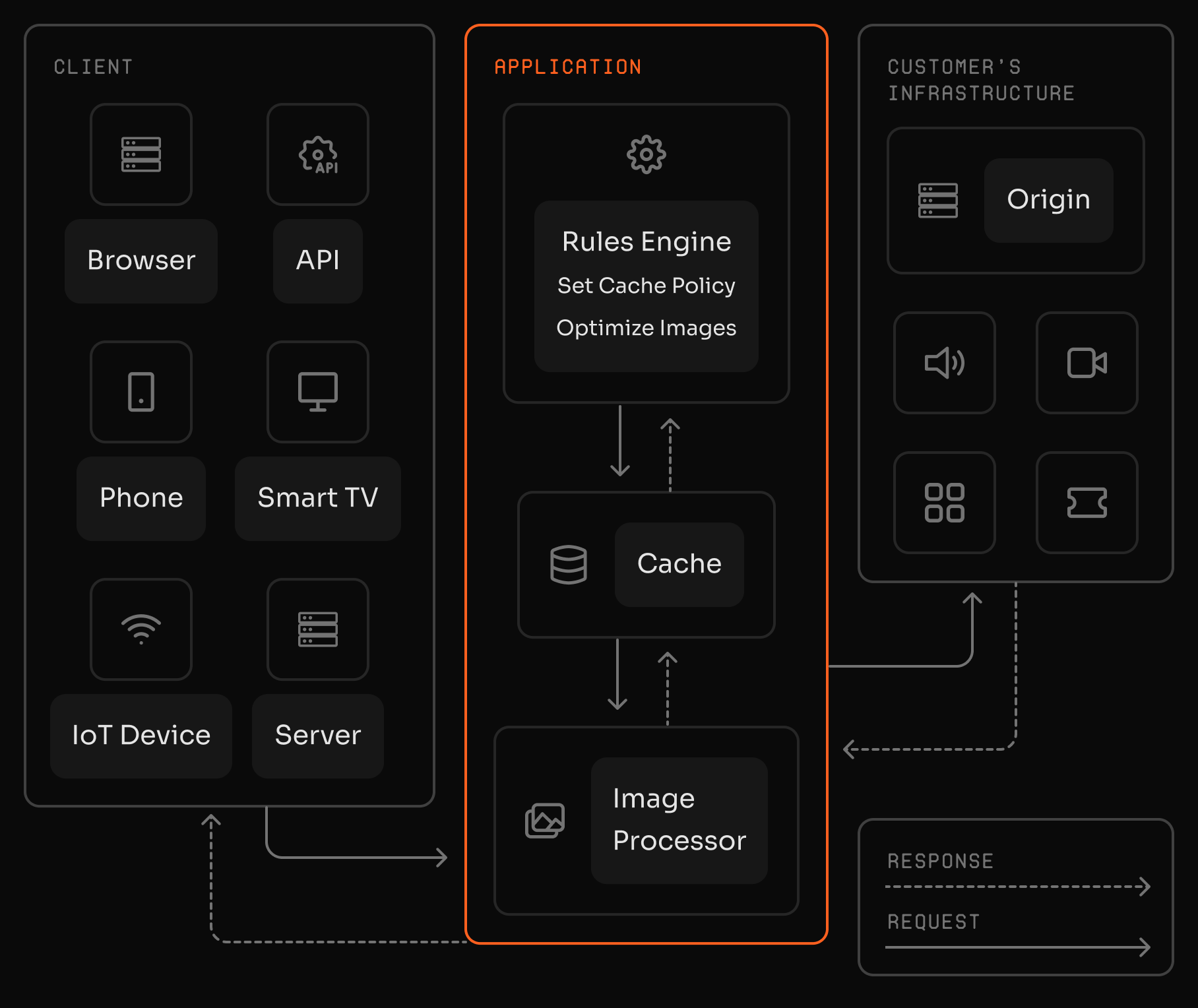
From source images to optimized delivery
Image Processor transforms existing origin images into optimized variants for modern web delivery.
Learn More
See how to use


"Azion's easy-to-use platform improved caching and content delivery, while Image Processor cut image sizes over 40% without quality loss."
Bruno Guidone
Head of DevOps at Mobiauto
A full-stack platform that scales instantly
Frequently Asked Questions
What is Image Processor?
Azion Image Processor is a real-time image optimization service that transforms images on demand from any HTTP-accessible origin. Key features include: automatic WebP/AVIF conversion based on browser support, on-the-fly resizing and compression via URL parameters, no separate storage requirement, support for JPEG/PNG/GIF/BMP/ICO formats, and up to 80% file size reduction. It improves Core Web Vitals without storing multiple image versions.
How does Image Processor differ from services that require image uploads?
Image Processor transforms images directly from your existing origin—object storage, web server, or CDN—without requiring you to upload images to a separate service. This means you maintain control over your source images, avoid storage costs, and can work with images from multiple origins without migration.
How do I resize an image with Image Processor?
Resize by adding an ims query string with width and height in pixels, using the format ims=WidthxHeight. You can also use fit-in/WidthxHeight to fit the image into a bounding box while preserving aspect ratio.
Can I preserve aspect ratio when resizing?
Yes. Provide only one dimension (using ims=Widthx or ims=xHeight) and Image Processor calculates the other dimension automatically to preserve aspect ratio.
Which image formats are supported?
Image Processor supports JPEG, GIF, PNG, BMP, ICO, WebP, and AVIF. Input formats can be converted to any supported output format via the ims parameter. WebP and AVIF delivery depends on browser support when using automatic format detection.
How do I convert an image to WebP or AVIF?
Use a format filter in the ims parameter to convert to webp or avif. For example, image.jpg?ims=webp converts a JPEG to WebP. For automatic format selection based on browser support, enable format conversion in your configuration and Image Processor will deliver the optimal format based on Accept headers.
What are the default processing limits?
The default limits are a maximum image size of 150 MB, maximum width of 3840 pixels, and maximum height of 2160 pixels. These limits can be adjusted based on your subscription plan.
Can I apply multiple transformations in a single request?
Yes. You can chain multiple filters inside the ims parameter, combining operations like resizing, quality adjustment, rotation, and format conversion in one URL. For example, image.jpg?ims=800x600:quality=85:webp resizes, adjusts quality, and converts format simultaneously.
How does caching work with Image Processor?
Transformed images are cached according to cache policies you configure via Rules Engine in Applications. This allows you to balance freshness with performance, keeping frequently-requested transformed images cached at global points of presence for faster delivery.
How can I measure the impact of image optimization?
Monitor traffic savings by tracking bandwidth reduction metrics in Real-Time Metrics, comparing processed images against original transfers over time. You can also observe Core Web Vitals improvements through your preferred analytics tools.
Can I migrate from Cloudflare Images to Image Processor?
Yes. Since Image Processor works with any origin, you can download your images from Cloudflare Images, host them at your preferred storage location, and configure Image Processor to transform them on demand. Update your image URLs to use Azion's ims query parameter format.
What happens if my origin is unavailable?
Image Processor requires access to your origin to fetch the source image. If your origin is temporarily unavailable, the transformation request will fail. Consider using Azion Cache with appropriate TTLs to serve cached transformed images during origin downtime.
Build once.Run everywhere.
Get a faster path to launch, lower latency, and less infrastructure overhead.